


�Hands down one of the best system analysis programs I've found in years. It�s lightweight, fast, and does exactly what it promises.�
See Inside Your PC. Deeply.
The advanced system information tool for gamers, developers, and PC builders. Monitor temperatures, detailed specs, and hardware health in real-time.
See What�s Inside Your PC
Speccy is the place to start if you need to know what�s inside your PC. See a quick summary, or dive deeper into every aspect of your PC's hardware so you can make informed upgrade and purchasing decisions.
Detailed Reporting
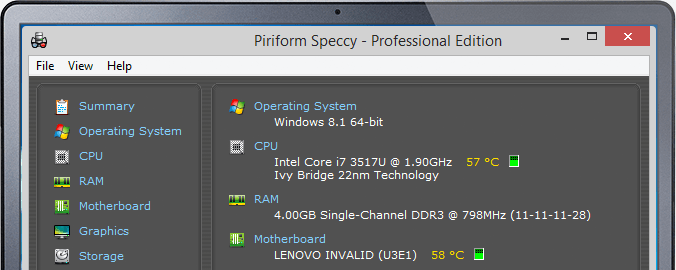
Speccy gives you detailed information on every piece of hardware in your computer. Save time trawling through your computer for stats like CPU, motherboard, RAM, graphics cards and more. See everything laid out for you in one clean interface.
Proactive Problem Solving
See real-time temperatures of critical components so you can easily spot problems before they occur.
Save Snapshots
Speccy allows you to save your scan results directly as a snapshot, XML or text file for easy sharing. Handy for making sure your new computer has the right specs, or if tech support need to diagnose an issue with your computer.
Technical Reference
Read-only queries and registry locations Speccy inspects to display system information.
Get-CimInstance Win32_Processor | Select-Object Name, NumberOfCores, NumberOfLogicalProcessors, MaxClockSpeed
Get-CimInstance Win32_PhysicalMemory | Select-Object Manufacturer, PartNumber, Capacity, Speed
Get-CimInstance Win32_VideoController | Select-Object Name, DriverVersion, AdapterRAM
Get-CimInstance Win32_DiskDrive | Select-Object Model, Size, FirmwareRevision
Get-CimInstance MSStorageDriver_FailurePredictStatus -Namespace root\wmi | Select-Object InstanceName, PredictFailure
HKLM\HARDWARE\DESCRIPTION\System\CentralProcessor\0
HKLM\SOFTWARE\Microsoft\Windows NT\CurrentVersion
HKLM\SYSTEM\CurrentControlSet\Control\ComputerName\ComputerName
HKLM\SOFTWARE\Microsoft\Windows\CurrentVersion\Uninstall
HKLM\SYSTEM\CurrentControlSet\Services\disk
Screenshots
Speccy vs. Windows Device Manager
| Capability | Speccy | Device Manager |
|---|---|---|
| CPU cores, threads, base/boost clocks | ? Detailed | Limited |
| RAM speed, timings, slots usage | ? Detailed | Basic |
| Real-time temperatures and sensors | ? Live | No |
| Storage S.M.A.R.T health | ? Yes | No |
| One-click snapshot sharing | ? Yes | No |
Speccy v1.33
User Stories
Real experiences from technicians, power users, and newcomers.
�This app displays all necessary PC information in a way that is incredibly friendly for novices. It feels just as essential to my workflow as CCleaner. Clean, simple, and powerful.�
�A much better way to learn about your PC than digging through the Windows Control Panel. It simplifies complex hardware data into an easy-to-read format.�
Feature request: driver information.
Great for desktops, though I'd love to see more battery-specific metrics for laptops in future updates.
�The 'No-Install' portable version is a lifesaver for technicians. It provides more technical depth than you would ever need for a free tool. A must-have for admin accounts.�
�Just installed on my new rig�it worked perfectly. No compatibility issues with the latest Windows updates. Thank you for keeping this alive!�
�Truly a very useful piece of software. It gives me the snapshots I need without bloating my system.�
Common Questions
Short answers to the most frequent questions about Speccy.